Features

Create tests quickly and easily.

Hexawise helps you select software tests that cover the most ground in the least amount of time.

Creating tests with Hexawise is as easy as:

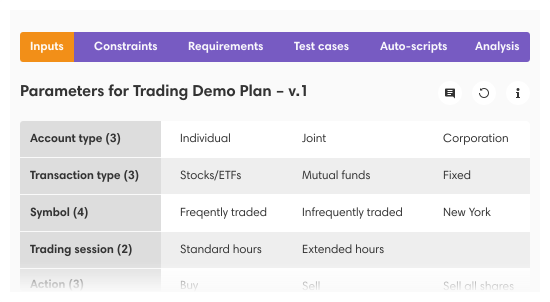
  1. Define your test inputs
  2. Create your powerful tests that maximize coverage
  3. Analyze your coverage

There’s much more to Hexawise, of course, but that’s the short version we give to our friends and relatives who wonder what we’re working on.


Use Hexawise on any kind of test project.

Hexawise is extremely flexible. You can use it to generate test cases for:

  • Applications written in all programming languages
  • All types of testing (Functional Testing, Configuration Testing, Performance Testing, Security Testing, etc.)
  • All testing phases (Unit Testing, Assembly Testing, Integration Testing, Systems Testing, User Acceptance Testing, etc.)

What if you want more thoroughness?

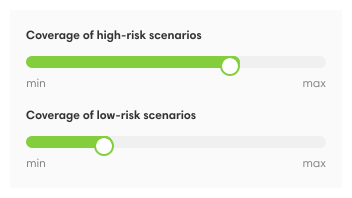
Hexawise has all the advantages of a pairwise test generation tool without the coverage limitations. When you generate tests with Hexawise, you have a simple (but powerful) coverage dial at your fingertips. Are you pressed for testing time and need to generate several dozen tests that cover as many cases as possible? Do you need to achieve an extraordinarily high level of coverage that can only be achieved by testing many thousands of efficient tests? Wherever you are on the spectrum, Hexawise has you covered. Based on the inputs you provide, Hexawise provides you with the test cases that cover the most ground in the least amount of time.

  • Select 2-way coverage to generate the most powerful few dozen tests.
  • Select 3-way coverage to generate the most powerful few hundred tests.
  • Select 4-way, or 5-way coverage to generate the most powerful few thousand tests.
  • Select 6-way to select the most powerful tens of thousands of tests.

By the time you’re testing all valid 6-way combinations of test inputs, you’re doing some seriously thorough testing. We only know of one software bug triggered by six separate test inputs and none from more than six. Hexawise allows you to increase or decrease the testing power to suit your needs. Very few testing projects require the thoroughness of 6-way testing, and few even require 4-way test solutions, but if 2-way testing isn’t enough, you can crank up the dial.


What if you need additional thoroughness only in selected areas?

One of the coolest powers Hexawise gives you is the ability to selectively focus more on certain areas of your testing activities than on others – even within a single set of Hexawise-generated test conditions.

In this example:

  • Suppose there are 19 Parameters
  • 4 of those Parameters were deemed to be especially important related to Risk-Based Testing considerations
  • Using the mixed-strength feature, the Hexawise-generated tests included every possible combination of the 4 sets of high-priority values (e.g., exhaustive coverage) in addition to the less exhaustive 3-way and 2-way coverage for other test inputs in the plan.
  • New users sometimes don’t “get” this feature. Experienced users absolutely love it.

What if you have values that can never be tested together?

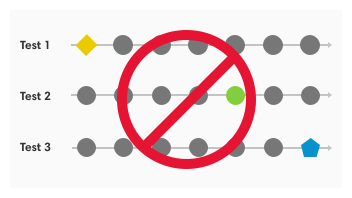
Some values just weren’t meant to be together. If you’re testing an Internet application for example, you’ll want to ensure that your tests don’t instruct testers to use Internet Explorer on the Mac OS X operating system. Hexawise handles such constraints with ease. With two clicks of your mouse, you will exclude such “impossible to test” combinations from your tests.


What if you don’t have time to execute all of the Hexawise-generated tests?

Based on the inputs you give it, Hexawise will generate the smallest possible number of tests to meet your coverage requirements. Even so, you won’t always have enough time to execute all of the tests Hexawise generates. What should you do?

Hexawise’s tests are front-loaded, so you will be able to stop at any time knowing that you have achieved the greatest possible coverage given the time you’ve had to test. Depending on your test plan and time crunch, it might make sense to stop testing before all test cases have been executed.

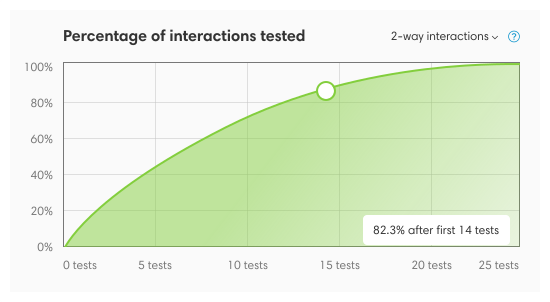
The coverage charts generated by Hexawise help you understand how large a risk you would be taking if you were to stop testing at any point.

  • Generate a coverage chart on the Analyze Coverage screen
  • Use information in the coverage charts to decide when to stop testing
  • Execute the first tests in the test plan until you run out of time
  • Hexawise also helps prevent users from accidentally selecting their test inputs in a way that leads to lots of extra tests being created
    • If a user entered far more test inputs than they required (e.g., over 100 separate entries representing ages, they would be inadvertently creating far more tests than they really need)
    • Logic within Hexawise sees train wrecks like this in the making and provides advanced warning signals to the user
    • Hexawise makes setting up equivalence classes easy (eg. 0-17, 18-35, 35-60, 60-140) and generates test values from within the range, focusing on the edge values first.

Tip: several of our experienced clients tell us they usually execute only the Hexawise tests that generate 80% coverage of all possible pairs of values (which is often only after one third of the generated tests have been executed); they then add several tests of their own creation, including tests that cover all the default settings and/or all the most common user selections.


What if you need detailed tester instructions in addition to test conditions?

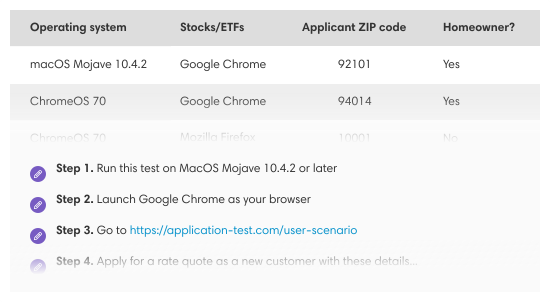
Hexawise allows you to automate much of the test script documentation process, so you’ll be able to document test scripts with detailed tester instructions far more quickly than you can by typing those tester instructions on a test script by test script basis. As show in the 30-second video, if you have a set of tests, you can use the Auto-scripting feature to:

  • Type your tester instructions once (e.g., “Select [Country] from the drop down menu on the left.”)
  • Every test generated by Hexawise will now include that tester instruction.
  • Even better, the tester instructions will automatically be varied for each test scenario (e.g., “Select Canada from the drop down menu on the left of the screen.”)

What if you need to import data from Excel or export tests into other tools?

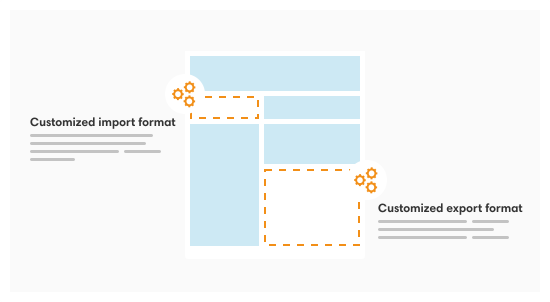
The outputs from Hexawise (namely sets of parameters, values, constraints, test cases and test scripts), are often imported into test management tools and automated testing tools. Hexawise supports importing to and from Excel. Once Hexawise outputs are in Excel (and therefore easily in CSV too), they can be imported by the following tools:

  • Test Management Tools
    • HP Quality Center
    • IBM Rational Quality Manager
    • …lots more…
  • Automated Testing Tools
    • HP Quick Test Pro
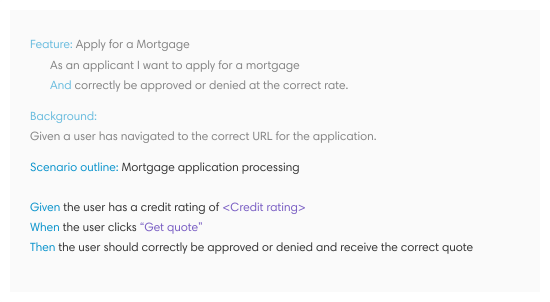
    • Cucumber
    • Selenium
    • Unit-testing fixtures
    • …lots more…

What if you need to solicit input or encourage reuse of testing assets?

Hexawise makes it easy for you to focus people’s attention on what’s important and solicit their feedback on it. Using Hexawise, business analysts, product managers, test leads, developers, and others on your team can quickly review a test planning strategy and provide their input. Hexawise also makes it easy to:

  • Share your test plans with others on your team to solicit their input
  • Give some people only “comment only” rights, and other people the right to edit and share your plans
  • Create and distribute “company approved” reusable template plans
  • Communicate test plan coverage with a couple executive summary pages generated by Hexawise (instead of lengthy, sleep-inducing documents listing test scripts that stakeholders realistically won’t read)
  • Communicate the benefits of using Hexawise to key stakeholders in your organization using Hexawise-developed ROI calculators and streamlined Proof of Concept pilot project approaches

Automatically maximize variation between tests.

Hexawise achieves this for you automatically from test case to test case.

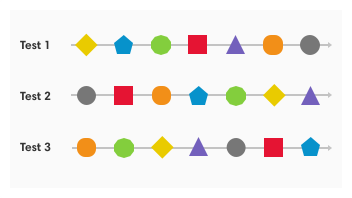
  • As shown in the [10 second video], all but one of the test conditions are different when you compare the first and second test cases.
  • This approach allows you to achieve coverage of as many new pairs of values as possible in each of your tests.
  • Maximizing variation helps you find more defects in fewer tests because you explore new areas and combinations.

Automatically minimize repetition in tests.

Hexawise automatically minimizes repetition from test case to test case.

  • Minimizing repetition comes with maximizing variation.
  • You avoid one of the most common drags on tester efficiency, unintentional repetition.
  • You find more defects faster because you avoid re-examining previously explored combinations.
  • Maximizing variation from test to test helps you find more defects in fewer tests because it helps ensure you explore new areas and combinations.

Hexawise is easy to use.

We aim to make it easy for you to get started. Lestor Bostic of Blue Cross Blue Shield reports, “we gave Hexawise to our intern and he was using it to generate tests 15 minutes later.” Hexawise includes:

  • Illustrative examples and FAQs
  • Links to clear, explanatory articles about combinatorial test design techniques
  • Training examples and computer-based training (CBT) exercises
  • An active user forum for questions and feedback
  • A comprehensive range of training, consulting and roll-out support services are also available