Hexawise recent updates
Hexawise recent updates
Automate: Generated data tables in Background now contain header rows
The specification for the Gherkin syntax is loose in many areas. It's not entirely clear if a data table in a Background section should have a header row or not. We've surveyed some Gherkin consuming tools, and enough of them expect a header for any data table that we've opted to now include a header row.
Automate: Auto-completion in and around single and double quotes
The parameter < > and parameter value selection { } auto-complete functionality could be sensitive to following or being contained in " or '. It's now robust in these conditions.
Regression in mind map display
In some cases mind maps would render with only text labels, but without the connecting colored lines.
Test plan revisions order
The revision order in the test plan revision's dialog was no longer sequential, making for a confusing user experience.
Automate: Selector autocomplete
Test case selector autocomplete after typing the { character used to present a list of all parameter/value combinations. The autocomplete now works in 2 steps, providing a selection of parameter names first, then autocompleting the open braket [ character and providing a list of parameter values for the selected parameter.
Automate: Including non-existing parameters in Examples table
An undocumented and rarely used feature of Hexawise Automate was to include a parameter selection in a Scenario Outline for a parameter that does not exist in the plan, such as:
When the <Not a real parameter> option is selected
This used to include Not a real parameter as a column in the Examples table with - for every row, since there are no values from the generated test case to use.
We've removed this feature as it was much more likely to obscure an unintended typo or parameter name change than to be useful.
Automate: Supercharged test case selectors
In Hexawise Automate you've been able to use the selector syntax, {[Parameter A]Value 1} to limit a Scenario or Scenario Outline to only the test cases that contain value 1 for Parameter A. The same syntax works in a Background section to limit all Scenario and Scenario Outline blocks in a feature file to test cases with the selected parameter value.
We've supercharged this capability by adding value lists and negation.
To limit test case selection to more than 1 value of a parameter, but not all of them, simply provide the parameter values as a comma delimited value list:
{Parameter A[Value 1, Value 2, Value 5]}
You can now also select with negation. To limit test case selection to everything except a value or value list, include the ! character before the parameter name:
{!Parameter A[Value 1]}
-or-
{!Parameter A[Value 1, Value 5]}
Selectors now supporting value lists and negation means it is much easier to target your behaviors at the specific test cases where they apply without needing to duplicate behaviors.
Automate: selector syntax
The syntax for selecting only test cases with value 1 for Parameter A used to be: {[Parameter A]Value 1}
We've now normalized this syntax so it matches the rest of Hexawise. The new syntax is simply: {Parameter A[Value 1]}
The new syntax also supports value lists and negation.
Automate: Selector expansion in Background
When including a parameter selector, {Parameter A[Value 1]}, in the Background section of your feature file, Hexawise used to replace the selector with the literal value, Value 1.
This option is no longer always available to Hexawise Automate since the selector can now use negation or a value list or both to be selecting on more than one parameter value. The generated Gherkin now contains a generated data table as shown here:

Automate: Automatic localization
To use a different language in Gherkin you start your script with a language tag as the first line. For example, Spanish:
#language: es
If you have your Hexawise account language set to Spanish, Japanese, or Esperanto (hey... you know Esperanto?), then new Automate scripts you create will now already include the language tag, saving you a step that's easy to forget.
As always, if your team or project needs support for other languages, please let us know.
Complete revamp of bulk edit of inputs
Performing bulk edit on imports has been reworked from a simple text area to an intelligent editor.
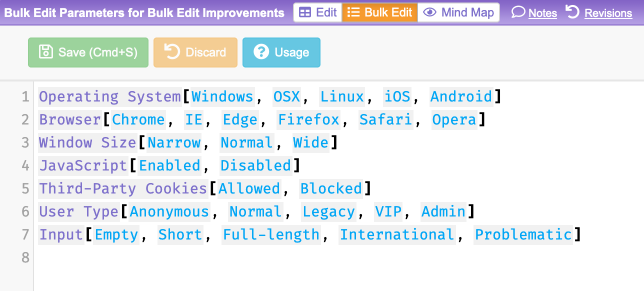
The new editor features:
- Standardized syntax used across the entire Hexawise test plan
- Consistent save and discard experience, with save hot key
- Real-time warnings when the syntax isn't valid
- Syntax highlighting
- Autocomplete
- Sample bulk edit text for blank plans
- Usage help with escaping examples
In the end, it's still just simple plain text being manipulated, so even though it looks fancy, you are still free to copy and paste text to and from bulk edit.
More Spanish localization 🇪🇸
Hexawise is completely internationalized and partially localized. We greatly increased the scope of the localization to cover the majority, though not the entirety, of the product. To take advantage of the localization, we also need to have translations. The Spanish translations were extended to cover all the newly localized areas of the product.
If you access "Your Account" from the top right drop down menu you can select Spanish as your language.
If there is language support that is important to your company and project teams, please let us know!
Plan deletion speed
Plan deletion, which can be slow for very large and heavily modified plans, now occurs asynchronously, so you don't need to wait for all the cleanup to occur before moving on to your next task in Hexawise.
"No possible value" shown in a generated test case in place of "any possible value" in very care cases
A rare three-way defect in production, this only effected mixed-strength test case generation with a range and value expansion.
"Stuck" no possible value warning banner
A regression caused the no possible value warning banner, which appears on a plan when you ignore a no possible value warning, to become "stuck" on the plan and not cleared out once the issue that caused the no possible value was removed from the plan.
No Possible Value Warning banner would remain after the triggering no possible value was removed
This was a regression in a part of Hexawise we thankfully no longer see too often since most "no possible values" are now prevented.
Hexawise hanging when saving bulk edit of inputs
This occurred on some plans and when the large number of parameter values warning was displayed.
Test plan dialog button states
Action buttons in the test plan dialog didn't disable after clicked allowing for multiple actions and therefore spurious warnings and errors.
The buttons are now disabled while in progress.
Repeating parameter values on requirements import of numeric parameter values
A classic defect of the pairwise genre. Only for certain types of data, and only on one of the many code paths. Resolved.
Pairwise defect creating parameter with a warning and error
This was an interesting pairwise defect. When you create a parameter in Hexawise with the same name as an existing parameter, you get an error. When you create a parameter with more than 7 parameter values you get a warning. What do you think happens if you do both of these at the same time? 💣
Fixed.
Over eager parameter reuse
The parameter name field in the parameter name dialog was a bit over eager treating a tab to the next field as if you selected a parameter for reuse from the auto-complete drop down. This made keyboard navigation of this dialog problematic.
Automate: Localization
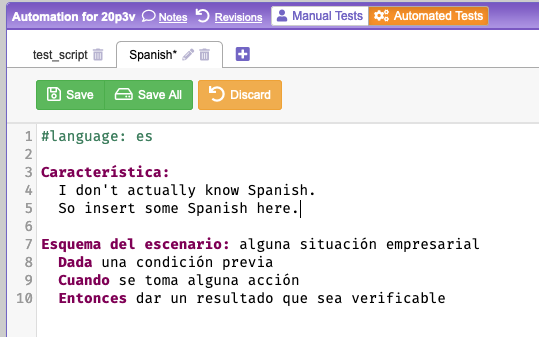
BDD with Gherkin is often described as writing your tests in Plain English. But what if your development team works in Spanish? Or Japanese? Or Esperanto (hey... it could happen)?
Here are the languages Gherkin supports. Hexawise Automate now supports the same.
To use a different language in Gherkin you start your script with a language tag as the first line. For example, Spanish:
#language: es
Then your Gherkin test script can be in Spanish.
Micro Focus ALM export customization
Customers with dedicated Hexawise instances now have more control over how they customize their Micro Focus ALM exports with a sequential field type and control over inclusion of default fields.
Issue with disallowed requirement creation
There were some rare cases where test plan constraints would disallow the creation of requirements as conflicting, even though they didn't conflict with any of the test plan's constraints.
Constraint terminology
In preparation for the introduction of more advanced constraints in Hexawise we've updated the terminology used to describe constraints to avoid the use of the term "pair" and "value pair". Constraints will be able to constrain more than just 2 parameters so the "pair" terminology will be outdated.
Old Term → New term
Invalid pair → invalid constraint
Married pair → bound constraint
Bi-directional married pair → mutually bound constraint
At the same time, we've updated the default Hexawise Excel import and export file format to include a single sheet for "Constraints" rather than separate sheets for invalid and married pairs. If you have existing files in the format with 2 separate sheets for these, they are backwards compatible and will continue to import.
You'll continue to see the old terminology in use in some help documentation and educational materials. These will be updated over time.